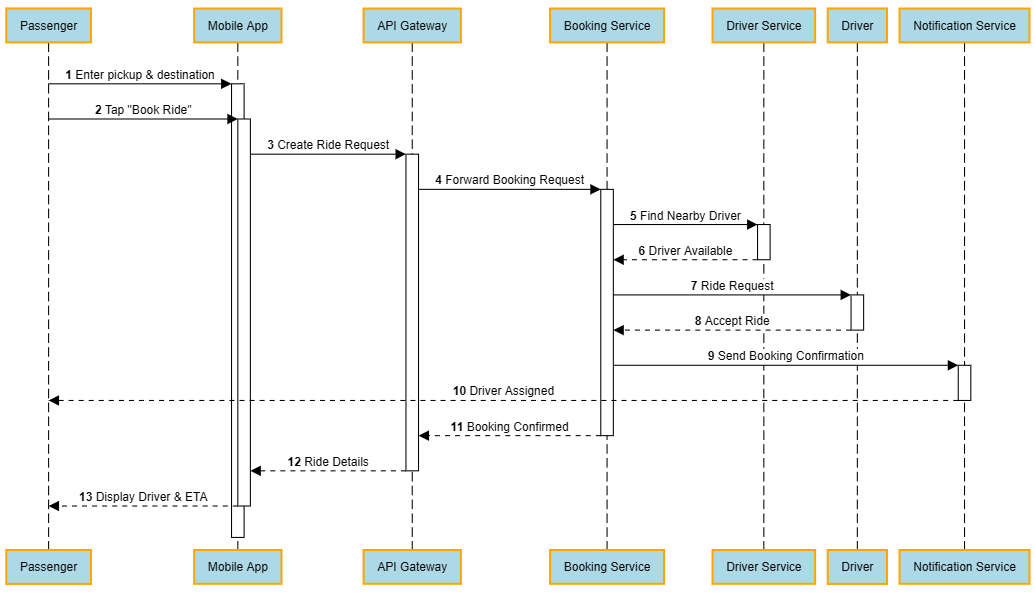
In integration projects, particularly those involving multiple integration points, I frequently use sequence diagrams to visualize the end-to-end interaction flow between systems. One of my preferred tools is SequenceDiagram.org, which provides a simple yet effective way to model system interactions, message exchanges, and process orchestration.
These diagrams help business stakeholders, solution architects, developers, and testers gain a common understanding of how requests and responses traverse across applications, APIs, middleware, and external services, making complex integration scenarios much easier to design, review, and troubleshoot.
For example, in an API-led architecture, a single client request may trigger a chain of interactions: an experience API calling a process API, which then orchestrates multiple system APIs, some synchronously and others via asynchronous events or queues. A sequence diagram captures this entire journey in a way that architecture diagrams alone often cannot.
When to Use Sequence Diagrams vs Architecture Diagrams
Both architecture diagrams and sequence diagrams play critical roles in integration projects—but they serve very different purposes.
Architecture diagrams answer the “what”:
- What systems are involved?
- What integration patterns are used?
- Where do APIs, message brokers, and data stores sit?
- How are environments logically grouped?
They are excellent for big-picture discussions and executive-level alignment. However, they often fall short when explaining runtime behavior.
Sequence diagrams, on the other hand, answer the “how”:
- How does a transaction start?
- Which system is called first, second, and third?
- Where are synchronous calls used?
- Where do asynchronous events, queues, or callbacks come into play?
- What happens when something fails or times out?
In practice, architecture diagrams set the stage, but sequence diagrams tell the story.
A good rule of thumb:
Use architecture diagrams for system landscape and design intent
Use sequence diagrams for request flows, orchestration logic, and behavioural clarity
In mature integration teams, both are used together—not as alternatives, but as complementary tools.
Common Mistakes in Integration Sequence Diagrams
Despite their usefulness, sequence diagrams are often underutilised or misused. Some common pitfalls include:
- Overloading a Single Diagram
Trying to capture every possible scenario—happy path, retries, failures, edge cases—into one diagram makes it unreadable.
Tip: Create separate diagrams for happy flow, exception flow, and alternative paths.
- Treating Everything as Synchronous
Many real-world integrations are hybrid. Representing asynchronous flows as synchronous calls hides important runtime behavior and leads to flawed assumptions during development.
- Missing System Boundaries
Failing to visually distinguish between consumers, integration layers, and backend systems can blur responsibilities. Clear lifelines and labels help reinforce ownership and design intent.
- Using Sequence Diagrams Only After Development
Sequence diagrams are most powerful when used early—during design discussions and solution reviews—not just as post-implementation documentation.