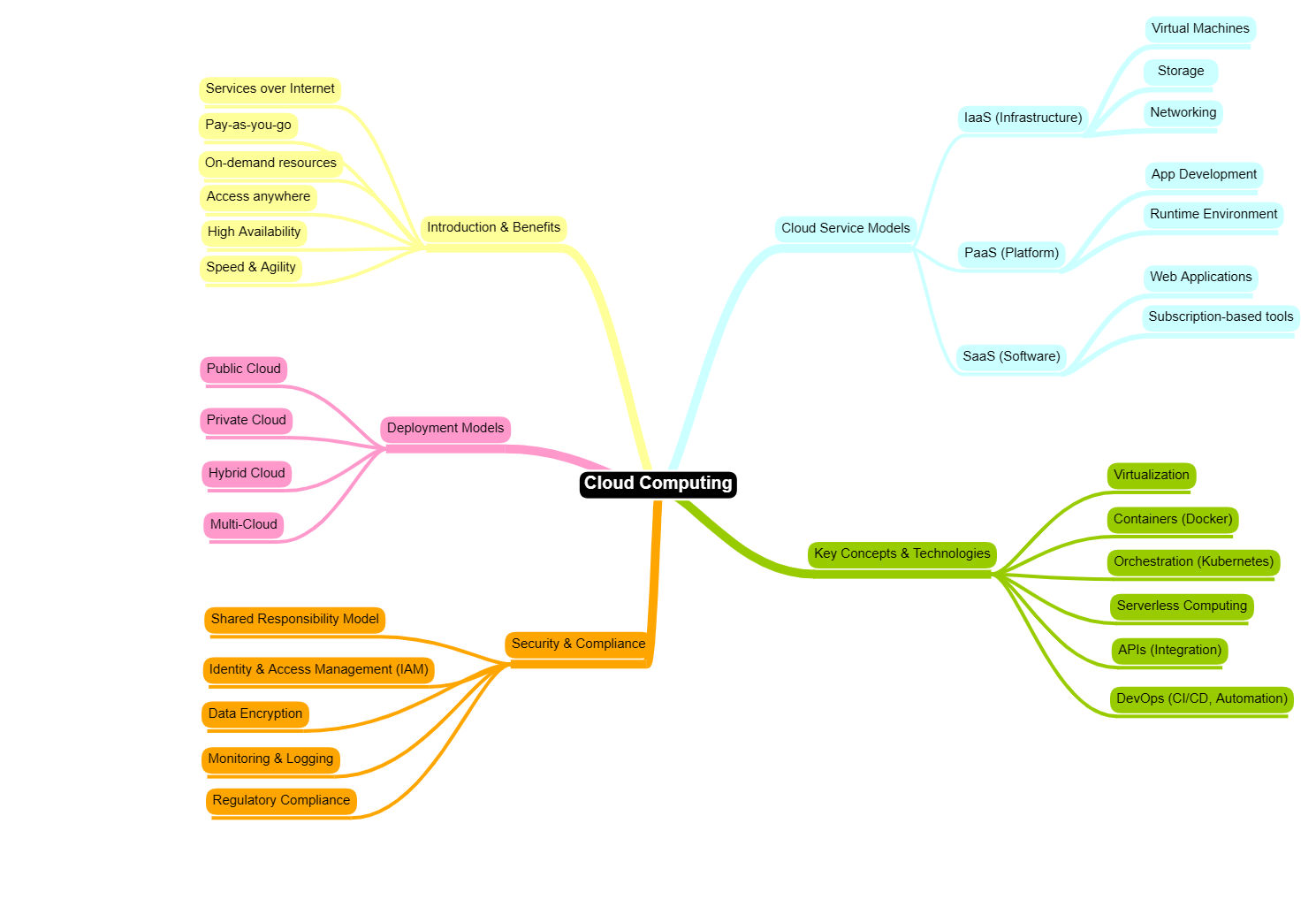

Cloud computing has been a major buzzword since the 2010s, and today more and more organizations are actively moving their on-premise systems to the cloud.
With this growing adoption, it’s important to understand the fundamentals—especially if you’re new to the concept. In this blog, I aim to highlight the key elements of cloud computing to help you get started.
Introduction & Benefits
Cloud computing refers to delivering computing services—such as servers, storage, databases, networking, and software—over the internet (“the cloud”) instead of using local machines or on-premise data centers.
Instead of buying and maintaining physical hardware, organizations can rent resources on-demand from providers like Amazon Web Services, Microsoft Azure, and Google Cloud Platform.
| Benefit | How |
|---|---|
| Cost Efficiency | Pay only for what you use |
| Scalability | Easily scale resources up or down |
| Flexibility | Access systems from anywhere |
| High Availability | Built-in redundancy and uptime |
| Speed | Rapid deployment of applications and services |
Cloud Service Models
Cloud services are typically divided into three main models:
| Model | Description |
|---|---|
| Infrastructure as a Service (IaaS) |
|
| Platform as a Service (PaaS) |
|
| Software as a Service (SaaS) |
|
Think of it like this:
- IaaS = Renting land
- PaaS = Renting a house framework
- SaaS = Renting a fully furnished house
Cloud Deployment Models
Deployment models describe how cloud environments are set up:
| Deployment Model | Description |
|---|---|
| Public Cloud |
|
| Private Cloud |
|
| Hybrid Cloud |
|
| Multi Cloud |
|
Key Concepts & Technologies
Understanding these core concepts will help you navigate cloud environments:
| Deployment Model | Description |
|---|---|
| Virtualization | Enables multiple virtual machines on a single physical server |
| Containers |
|
| Container Orchestration |
|
| Serverless Computing |
|
| APIs (Application Programming Interfaces) | Allow systems to communicate and integrate |
| DevOps | Combines development and operations to improve delivery speed |
Security & Compliance
Security in the cloud is a shared responsibility between the provider and the customer.
| Key Areas | Description |
|---|---|
| Identity & Access Management (IAM) | Control who can access what |
| Data Encryption | Protect data at rest and in transit |
| Monitoring & Logging | Detect suspicious activity |
| Compliance | Meet regulatory requirements (e.g., financial, healthcare) |
Shared Responsibility Model:
- Provider secures the infrastructure
- You secure your applications and data